
Transferring pics in a snap
Published: Saturday | September 5, 2009
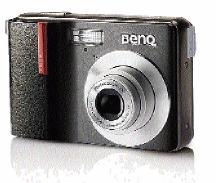
The BenQ DC C850 digital camera.
Payton H. Wilmott, Gleaner Writer
Two weeks ago we looked at ways we could use photographs taken in the hard-copy format. This week we'll finish off with how to make use of these same photos the soft-copy way.
What's soft copy?
This process is far more economical on your pocket than the hard-copy strategy because it relies heavily on the use of the Internet and other inexpensive media. The photos should be stored either on a memory card, CD, DVD or flash drive to make the transition to the Internet less of a hassle.
How do I get my photos on a flash drive?
There are two ways to get your photos on a flash drive or any other storage medium. The first way is to take your photos with a digital camera. A digital camera doesn't use conventional film that you'll have to develop after you've finished. That way, the photos would be instantly stored as data files. Afterwards, all you have to do is use the USB cable that comes with the digital camera and transfer the pics to your personal computer and then to your flash drive or any other storage medium.
The BenQ DC C850 and HP Photosmart R727 are extremely user-friendly digital cameras, specifically designed for easy data transfer.
The other method is to scan the photographs. Yep, for all those persons out there who have already printed their photos, all you'll have to do is scan them.
First, you'll need a scanner. Scanners are cheaper than the cheapest printer available now, so persons don't have to worry too much about the price factor. All it really does is take a digital photo of your old photo and save it to your PC. Brands like LG and BenQ are popular names you should look for if you're planning on getting one of your own.
My photos are data files now - what next?
You have the freedom to do as you wish with the photos once they are on your PC.
Options
A. You can email your friends and families overseas photos of a special event or occasion.
B. Show the world the wild parties you have been to during summer by posting those pictures on your Hi5 or Facebook profile.
C. Edit and personalise your photos by adding frames and word art on them before using them.
Closing Thoughts
I made a greeting card all by myself with my friend's picture that was saved on my PC. I know that's cheap but made so much of a difference.
The products mentioned in this article were provided courtesy of Royale Computers and Accessories. Telephone 906-1067, 906-1068 or 754-5048.