Paul Messam, Gleaner Writer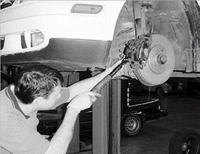
Brake servicing is done at most garages and by competent mechanics around.
A BIG enemy of efficient braking is heat. Friction caused by the rubbing of the shoes against the surface of the drums generates terrific heat. This is the sort that is built up when you rub the palms of your hands together.
Heat causes the surface of the brake shoes and drums to lose their abrasive qualities. This means that the two surfaces tend to slip over each other, and so reduces the drag, which causes the motor vehicle to slow down.
scraping noises
With the heat, wear and tear, uptown, downtown driving, around town, out of town at some point your brake pads will have to be replaced. Don't beat any drums, get the facts and set to work. It is imperative that you replace disc-brake pads (linings) before they wear badly enough to cause scraping noises when the brakes are applied.
"A scraping noise indicates that the pads have worn and the metal shoes which support the pads are rubbing against the metal discs," says Steve Wright, an experienced auto mechanic. "Inspect the pads by removing one of the front wheels. Examine the pads through an inspection hole, if there is one; if not, remove the pad and measure the lining."
Follow these steps as a simple guide to replacing disc-brake pads.
1. Examine the caliper for guide pins that hold pads in place.
2. Remove the locking clips from guide pins. Pull guide pins out.
3. Does the installation use an anti-rattle spring? If so, remove it.
4. Grab pads and slide them straight out of the caliper. If this is difficult to do, get a hook from a coat hanger, then hook guide pinholes and pull out pad.
5. Examine the boot surrounding the piston in the caliper for fluid leakage. If fluid is present, remove and overhaul the caliper.
6. Wrap a rag around the shank of the screwdriver. Place this against the piston and push the piston back into the bore.
7. Slide new pads into the caliper. Reinstall the anti-rattle spring, if one is used, and reinsert guide pins and locking clips.
Some pistons cannot be moved back into the caliper with the force exerted from a screwdriver. If you try it and it does not work, don't force it. Use a C-CLAMP instead. Then engage the outer jaw of the C-CLAMP over the piston and the inner jaw on the caliper. Tighten the clamp slowly. If the piston still does not move, it may be frozen. The entire caliper must be overhauled. Before pushing the piston out of the way, take the cover off the main brake-fluid reservoir and use a clean rag to catch any fluid that may be forced out.
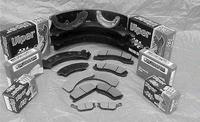
This is what your brake pads look like.